

Email Notification Management
Novacal provides a comprehensive email notification system that puts you in control of your communication preferences. You can customize subject and content and other settings, and decide which notifications you want to receive and turn off any that you don’t need.Our notification system includes:
Reminder notifications - by default sent 60 minutes before each event Confirmation notifications - sent when bookings are confirmed Cancellation notifications - sent when events are cancelled Update notifications - sent when events are rescheduled or modifiedCustomization
To customize, click on desired notification type and there you can edit settings with dynamic variables. Customize your notification preferences in your event type settings to ensure you stay informed about the events that matter most to you.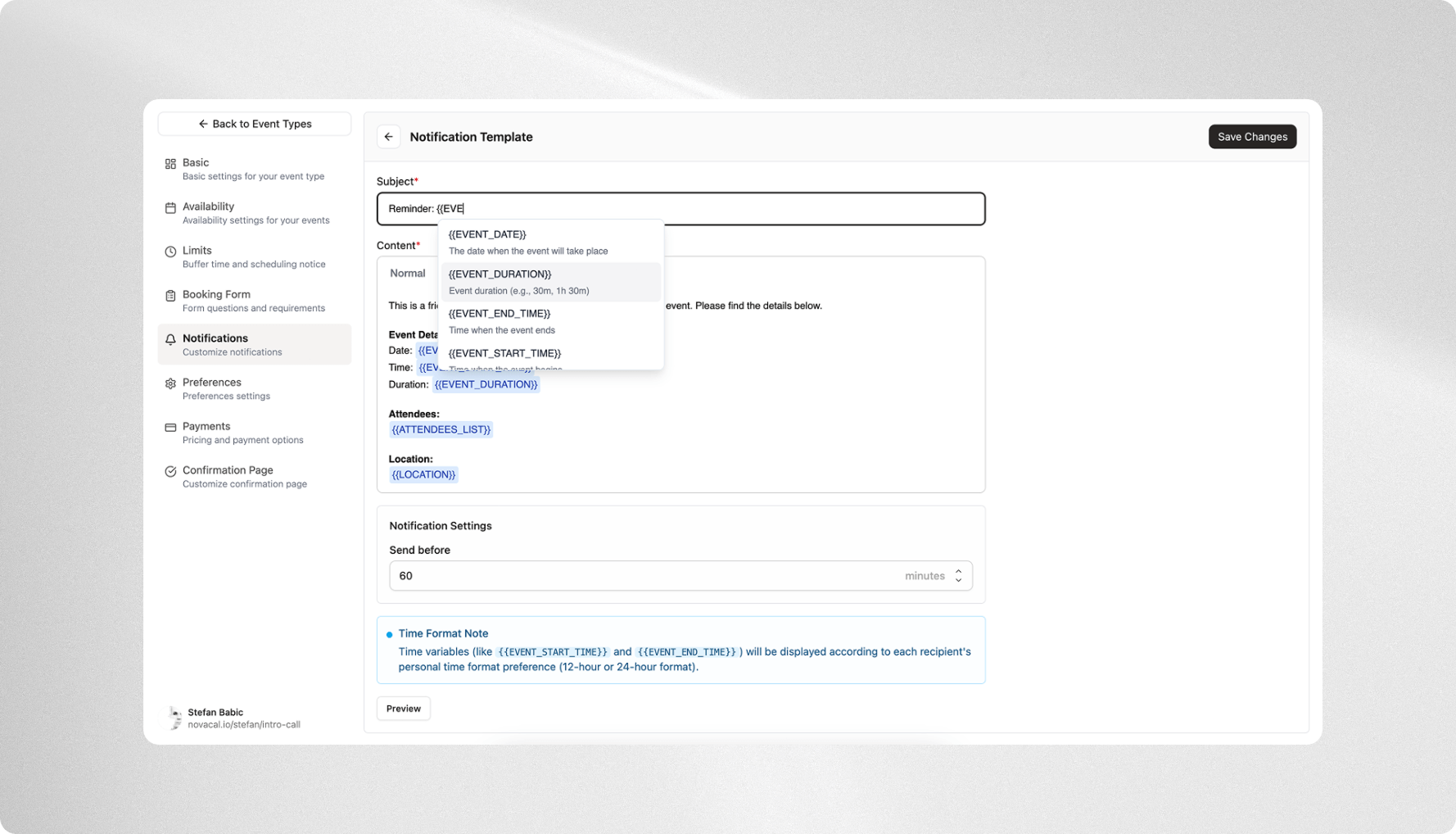
Notification Variables
Customize your notifications using a variety of dynamic variables. These variables can be utilized to personalize both the subject and content of your notifications. Below is a breakdown of the available variables and how you can use them:-
EVENT_DURATION: Event duration (e.g., 30m, 1h 30m)- Scope: Subject, Content
- Usable: Before, On Create, On Update, On Cancel
-
EVENT_DATE: The date when the event will take place- Scope: Subject, Content
- Usable: Before, On Create, On Update, On Cancel
-
EVENT_START_TIME: Time when the event begins- Scope: Subject, Content
- Usable: Before, On Create, On Update, On Cancel
-
EVENT_END_TIME: Time when the event ends- Scope: Subject, Content
- Usable: Before, On Create, On Update, On Cancel
-
ATTENDEES_LIST: Formatted list of all event participants- Scope: Content
- Usable: Before, On Create, On Update, On Cancel
-
LOCATION: Physical or virtual meeting location details- Scope: Content
- Usable: Before, On Create, On Update, On Cancel
-
FORM_ANSWERS: All answers provided in the booking form- Scope: Content
- Usable: Before, On Create, On Update, On Cancel
-
PREVIOUS_EVENT_DATE: Original date before the event was rescheduled- Scope: Subject, Content
- Usable: On Update
-
PREVIOUS_EVENT_START_TIME: Original start time before the event was rescheduled- Scope: Subject, Content
- Usable: On Update
-
PREVIOUS_EVENT_END_TIME: Original end time before the event was rescheduled- Scope: Subject, Content
- Usable: On Update
-
CANCELLATION_REASON: Explanation provided for why the event was canceled- Scope: Content
- Usable: On Cancel
Notification Settings
Reminders
- Users can set the number of minutes before an event when reminder notifications should be sent. The default setting is 60 minutes before the event starts.
Created Notifications
- When an event is created, users have the option to include or exclude iCal attachments in the notifications. By default, iCal attachments are included.
- Additionally, users can decide whether to include or exclude reschedule and cancellation links in these notifications. These links are included by default.
Update Notifications
- Similarly, for notifications sent when an event is updated, users can include or exclude iCal attachments. By default, these attachments are included.
- Users can also choose to include or exclude reschedule and cancellation links in update notifications. By default, these are included as well.